Virtual TimeClock allows you to export your time clock data to a text file for analysis with your favorite text editor or spreadsheet software. Employee hours can also be imported directly into several popular payroll programs that allow time clock integration using a specially formatted export file.
Let's talk about exporting timecard reports into Excel. There are a couple of ways you can open the reports in Excel, depending on the file format you choose when exporting the data.
If it's a tab separated export file
When you right mouse click on the text file, choose Open With and then Microsoft Excel. If Excel is not a choice then you will need to select Choose Program and pick Microsoft Excel from the list.
If it's a comma separated export file
When you right mouse click on the file, choose Rename and then change the .txt extension to .csv. When you double-click the file it should open right up in Excel.
Jeff
Technical Support Team
Redcort Software, Inc.
Showing posts with label exporting. Show all posts
Thursday, August 16, 2012
Thursday, September 16, 2010
QuickBooks Accounting Software Integration
As we've discussed in the past, there are several different systems involved in the payroll process. Employee time clock software gathers and prepares employee hours for payroll by segregating regular hours, overtime hours, and paid leave for the payroll period into separate totals. Your payroll system generates the checks after multiplying the different hours categories by the appropriate rate for each employee and applying the necessary state and federal deductions. Finally, business accounting software is used to record the payroll journal entries into your general ledger.
The new Virtual TimeClock payroll integration feature allows you to export your employee payroll for use in uploading into several popular payroll systems like SurePayroll, Paychex Preview, Paychex Online, PayChoice, AccountEdge, and CheckMark Payroll. Many of these payroll providers offer accounting integration to QuickBooks so payroll journal entries can be automatically posted to your general ledger.
We've partnered with SurePayroll, the leading online payroll provider, to offer Virtual TimeClock software users a payroll time clock software solution that allows you to go from time clock to paycheck in a few simple steps. Add QuickBooks accounting integration, and the process is automatically completed by eliminating duplicate entry and the chance for errors.
SurePayroll provides accounting integration with the following Intuit QuickBooks products:
- QuickBooks 2010 Pro, Premier, and Enterprise Solutions
- QuickBooks 2010 for Mac
- QuickBooks 2009 Pro, Premier, and Enterprise Solutions
- QuickBooks 2008 Pro, Premier, and Enterprise Solutions
- QuickBooks Pro and Premier 2003-2007 (Intuit has discontinued technical support and business services for QuickBooks 2007 and older, and recommends upgrading to QuickBooks 2010)
This means Virtual TimeClock + SurePayroll + QuickBooks = Worry Free Payday
Jeff Morrow
Technical Support Team
Thursday, July 22, 2010
Understanding the Payroll Process
There are several different systems involved with processing employee payroll, and each one serves a critical function. You've got the employee time tracking system which gathers employee hours. You've got the payroll system which generates the checks. And you've got the business accounting system for recording the payroll entries in your general ledger.
It's easy to get confused about the role of these payroll processing systems and how they're interrelated. Hopefully, this brief description will clear up any confusion.
Time Clock Software
Your employee time tracking system may consist of time cards and a punch clock, hand written paper timesheets, or time clock software. Employee time clock software takes much of the effort out of time and attendance tracking by providing accurate and impartial recording of all time worked, which keeps employees accountable for actual time on the clock. It saves you countless hours by automatically applying overtime rules and performing all of the time card calculations for you. Think of employee time clock software as providing the first step in payroll processing by instantly gathering and totaling all hours worked during the payroll period. Employee hours can then be reported to your payroll provider, manually entered into a payroll system, or exported to a file for easy import into your online payroll service.
Payroll Software
The next step in processing payroll is to generate employee checks. Your payroll solution will make all the necessary calculations for gross pay based on the hours provided by your time clock software, as well as all of the deductions for federal and state income tax withholding, FICA, and any voluntary deductions for insurance premiums or retirement plans. You may print employee paychecks in-house with your own payroll software, fax or phone in employee hours to your payroll service or accountant, or submit employee hours using an online payroll service that pays employees through direct deposit. Your payroll service may also file all state and federal quarterly and annual payroll taxes on your behalf.
Accounting Software
The final step in payroll processing is to get the payroll entries into your general ledger. This can be accomplished by either manual entry of the data based on the payroll reports received from your provider, or automatic posting of the payroll entries by exporting the payroll data from your online payroll service into your accounting software.
Each system is interrelated but has a distinct role and function within the payroll process, but there could be some overlap. For example, your accounting software may also be able to generate employee paychecks through an add-on payroll module or service. I hope this helps explain the progression from time clock to pay check.
Jeff Morrow
Time Clock Software Support Specialist
Thursday, October 8, 2009
Exporting Your Time Clock Data
Questions about exporting timecard data seem to come in waves, so grab your surf board and let's talk about it.
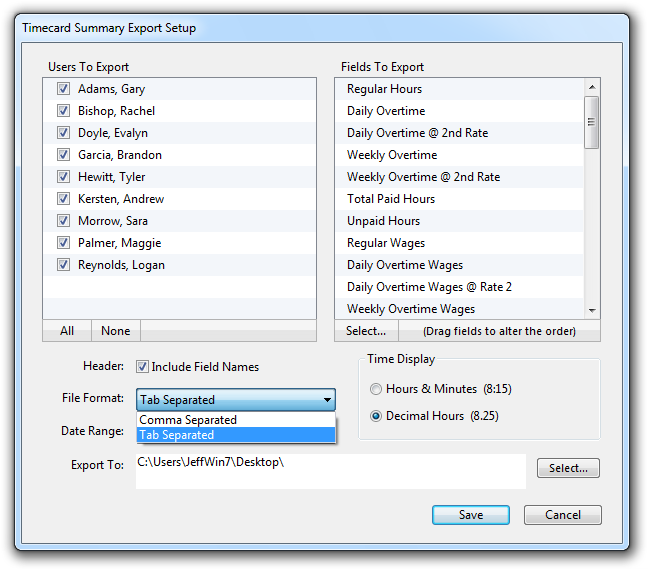
You can export your time clock software data to a tab or comma separated text file. This means you can open and edit the data in any common text editor or spreadsheet software (like Excel or Numbers). You can also export directly to CheckMark Payroll.
If your payroll or accounting software supports text file importing (many do), then you're all set. Just choose Export from the File menu to get started.
Cowabunga!
Jeff Morrow
Subscribe to:
Posts (Atom)
