Virtual TimeClock Network Edition is a client-server based time clock system that allows you to run time clocks on multiple computers. Licensing is based on the number of computers that need to run the time clock software, not the number of users. This allows you to deploy time clocks on individual computer workstations or as time clock kiosks that allow a group of employees to clock in and out from a particular computer.
When you receive your Network Edition license email from us, it will have a Program License Key and a Client License Key. You only have to enter your registration information one time. The most common place to register your employee time clock software is from the Help menu of one of your time clock clients. This will update the time clock server so you DO NOT need to enter the license information on the other time clock clients. You can also register your time clock software from the Licenses panel of the Virtual TimeClock Server Manager.
Jeff
Tier 2 Tech Support
Redcort Software, Inc.
Showing posts with label licensing. Show all posts
Showing posts with label licensing. Show all posts
Thursday, July 11, 2013


Thursday, April 11, 2013
Citrix Load Balancing
A load balancer is responsible for directing network traffic among multiple servers hosting the same applications. By balancing requests across multiple servers, a load balancer prevents any one server from becoming a single point of failure, which improves availability and responsiveness.
We occasionally run across customers that are using load balancing to distribute the load of network traffic across their server farms. This means that Citrix users could be directed to any one of the servers based on current traffic, which may present a licensing issue with their time clock software. Because Virtual TimeClock is licensed per computer connection, you'll need a client license for each Citrix user that needs to run the time clock, and if your Citrix users are routed to the next available server in the farm, then you'll need a client license for that user for every server they could potentially connect to. This means if you have 5 time clock users and you have a 2 server farm, then you'll need 10 Virtual TimeClock client licenses.
Jeff
Technical Support Team
Redcort Software, Inc.
We occasionally run across customers that are using load balancing to distribute the load of network traffic across their server farms. This means that Citrix users could be directed to any one of the servers based on current traffic, which may present a licensing issue with their time clock software. Because Virtual TimeClock is licensed per computer connection, you'll need a client license for each Citrix user that needs to run the time clock, and if your Citrix users are routed to the next available server in the farm, then you'll need a client license for that user for every server they could potentially connect to. This means if you have 5 time clock users and you have a 2 server farm, then you'll need 10 Virtual TimeClock client licenses.
Jeff
Technical Support Team
Redcort Software, Inc.
Thursday, March 8, 2012
Out of Time Clock Licenses?
Virtual TimeClock Network Edition licensing is based on the total number of computer connections using the time clock. Once a time clock client connects to the time clock server, it will register itself and use a license. That license still remains in use if the time clock gets turned off or even removed from that computer. If you get an out of license message when connecting to your Virtual TimeClock Server, asking these simple questions first may help you solve the issue on your own.
- Has Virtual TimeClock been installed on any new computers?
- Have you moved any computers?
If you get a new computer or move your time clock to a different computer, you'll need to remove the registration of the old time clock client from the Virtual TimeClock Server Manager. To remove the old computer registration:
- Launch the Virtual TimeClock Server Manager.
- Click the Licenses toolbar button.
- On the right hand side you'll see a list of registered computers. Select the name of the old computer and click Remove Client.
If the name of the registered computers doesn't help you pick the right one, then you can delete all of the registered clients that have a red status indicator showing they're currently disconnected. It's also not uncommon for your IT support to inadvertently use client licenses when they're remotely installing or maintaining your time and attendance system.
Angie
Technical Support Team
Thursday, October 27, 2011
Are You Still Evaluating?
Did your free time clock software trial expire even though you purchased a license? Chances are, you never entered your key codes. The Virtual TimeClock evaluation is a great testing tool because:
So if you purchased a Virtual TimeClock license and you're getting a message stating that your free evaluation has ended, grab the license email we sent you when you ordered and get those keys entered.
Registering Basic/Pro Edition
Go to the Tools menu and choose Enter License Key.
Registering Network Edition
Launch Server Manager, click on the Licenses toolbar button, and click the Enter Keys button.
Need another copy of your license? Contact us, we keep great records!
Jeff
Technical Support Team
Redcort Software
- It's fully functional, which means you can test every feature.
- There's nothing new to download or install after purchasing a license.
- You don't lose any of the employee data you collected during the trial period.
So if you purchased a Virtual TimeClock license and you're getting a message stating that your free evaluation has ended, grab the license email we sent you when you ordered and get those keys entered.
Registering Basic/Pro Edition
Go to the Tools menu and choose Enter License Key.
Registering Network Edition
Launch Server Manager, click on the Licenses toolbar button, and click the Enter Keys button.
Need another copy of your license? Contact us, we keep great records!
Jeff
Technical Support Team
Redcort Software
Wednesday, September 21, 2011
Out of Time Clock Client Licenses?
When you first connect a Virtual TimeClock Pro Client to a Virtual TimeClock Server, the time clock client computer registers it's computer name and uses one of your available licenses. If you get a new computer or need to move your time clock client to a different computer, you'll need to remove the registration of the old computer time clock. Otherwise, you'll likely receive the following message.

To remove the old computer registration, launch the Virtual TimeClock Server Manager and click the Licenses toolbar button. On the right hand side you'll see a list of registered computers. Select the name of the old computer and click Remove Client.
Blair Crump
Technical Support Team
Redcort Software

To remove the old computer registration, launch the Virtual TimeClock Server Manager and click the Licenses toolbar button. On the right hand side you'll see a list of registered computers. Select the name of the old computer and click Remove Client.
Blair Crump
Technical Support Team
Redcort Software
Thursday, February 24, 2011
Expired Time Clock Software Licenses
If you receive a license key verification failure when launching Virtual TimeClock for the first time after upgrading, the most common cause is from not entering your most current license key. Your employee time clock software will run as an evaluation until your current license key is entered. Just let us know if you need another copy. It's important to enter your new license key after we process your software maintenance & support renewal so you can take advantage of free time clock software upgrades and updates.
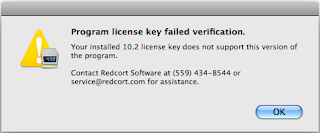
You'll also get a license key verification failure if you upgrade your time clock and you're not enrolled in our software maintenance & support program. Once again, your employee time clock software will run as an evaluation until a valid license key is entered. A member of our customer service team would be happy to send you discounted upgrade pricing for the latest Virtual TimeClock release.
Maggie Hofer
Wednesday, June 30, 2010
Lost Your Time Clock Software License?
If your computer time clock crashes or you just need to move your time clock software to a different computer in order to make it more convenient for employees to punch in and out, then you'll need a copy of your most recent software license key. Your software license key is emailed to you shortly after purchasing or renewing your time clock software maintenance and support.
If you've lost, misplaced, or deleted your registration information, don't worry! We keep great records. Contact us with your company name and the software product you need to register, and we'll be happy to provide you with a copy of your software license key. Meanwhile, go ahead and get your time clock software moved to that new computer. Virtual TimeClock will run in evaluation mode until a valid program license key is entered.
Maggie Hofer
Time Clock Software Customer Service
Friday, June 18, 2010
Registering Your Time Clock Software
It's important to register your new Virtual TimeClock software soon after purchasing so you can continue to use it without interruption. For those of you who've taken advantage of the free time clock software evaluation, entering your license key turns your free time clock software trial into your permanent time and attendance solution. How easy is that?! There's nothing new to download and you don't have to rekey your employee information all over again.
After processing your order, we'll send you a custom software license key via email. Be sure to follow the step-by-step instructions in your license email for entering your new license key, since they may be different depending on which edition of the time clock software you're using. Your company name and address information must be entered into Virtual TimeClock exactly as it appears on your software license email, this includes capitalization and punctuation.
You should receive a confirmation dialog stating that your software has been successfully activated. If your license activation fails, you'll always receive a very specific message telling you the reason why. It's usually because the company name or address doesn't match, or you're trying to register a different edition of the software than what you purchased the license for.
Maggie Hofer
Time Clock Software Customer Service
Subscribe to:
Posts (Atom)

 Posts

